



AI Enablement, Copilots, and AI Agents: What They Are and How They Benefit Your Business
Thinking about AI Enablement in a business may sound like a luxury—or something not truly necessary for day-to-day operations. However, today it’s becoming a necessity.
In 2021, it was estimated that 20% of companies had some kind of automation in their processes, but that figure jumped dramatically in just four years. Today, 70% of organizations already integrate AI into their daily tasks, reducing operating costs and streamlining their operations.
Want to implement it in your company? Below, we explain everything you need to know before you do.
What does AI Enablement mean?
In a business context, it means implementing AI that makes decisions and executes actions in real business operations. These AI Agents are connected to your systems (CRM, ERP, e-commerce, etc.) and work in a controlled manner.
Unlike AI platforms such as ChatGPT, an AI Agent combines an AI model, a specific objective, tools that allow it to act, clearly defined rules and permissions to limit its scope, and a workflow cycle that can involve observation, decision-making, actions, process verification, and even reporting.
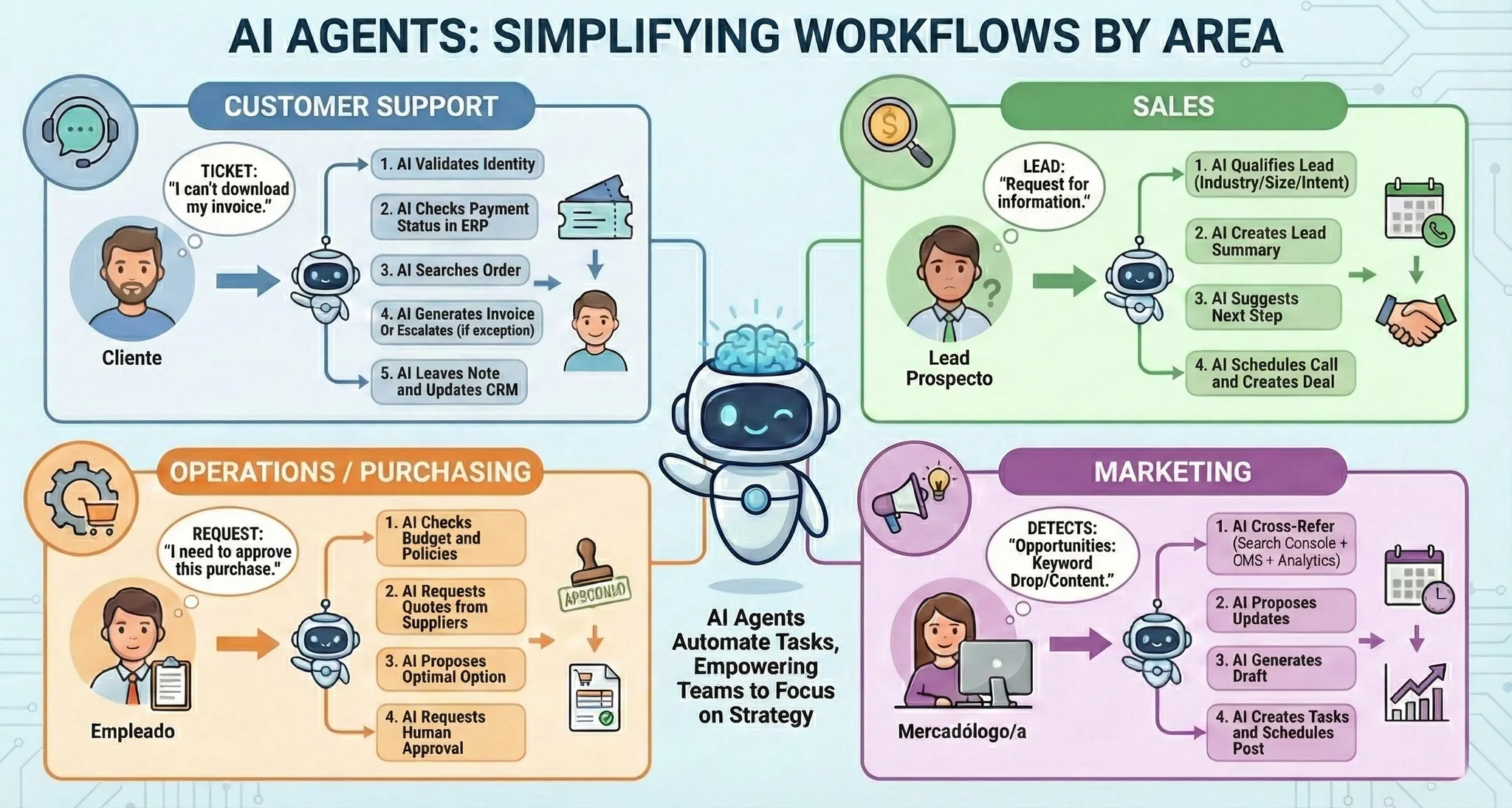
Thanks to AI Agents, you can automate tedious tasks such as classifying tickets, preparing weekly reports using data from multiple sources, generating proposal drafts for review, and even following up on pending items.
In which business areas can an AI Agent be implemented?
There are several scenarios where AI Agents can be highly effective. One of them is customer service, where they can resolve many of the questions from people who contact you.
You can see an example of this in apps like Mercado Libre and Mercado Pago, where before you reach a human representative, you are assisted by an AI Agent programmed to solve more complex questions.
Amazon also implements AI systems to predict demand, optimize inventory, and reduce delivery times.
These AI Agents can interact with you using natural language, greet you, respond with empathy to an upset customer, and even maintain a polite tone throughout the interaction.
In sales, AI Agents can also play an important role by triggering responses to a potential lead almost immediately, eliminating waiting times. In this context, an AI Agent can qualify the customer based on the criteria you set, build a complete profile report, and even assign the case to a sales rep for personalized follow-up.
How is an AI Copilot different from an AI Agent?
An AI Copilot is essentially an assistant enhanced by artificial intelligence—it supports you while you work. You decide and execute every step it takes. You can ask it for ideas, have it draft a report, or help you with a complex analysis. These tools are designed to boost individual productivity without fully handing over control of processes and tasks.
If your company has a website, you can implement an AI Copilot to help users resolve questions or guide them through a process.
An AI Agent operates with limited autonomy, meaning it carries out assigned tasks defined by rules and permissions, without necessarily requiring a human to approve each part of the process. These tools are designed to run repeatable and measurable processes, as well as tasks that require 24/7 availability.
How do you know whether you need an AI Copilot or an AI Agent?
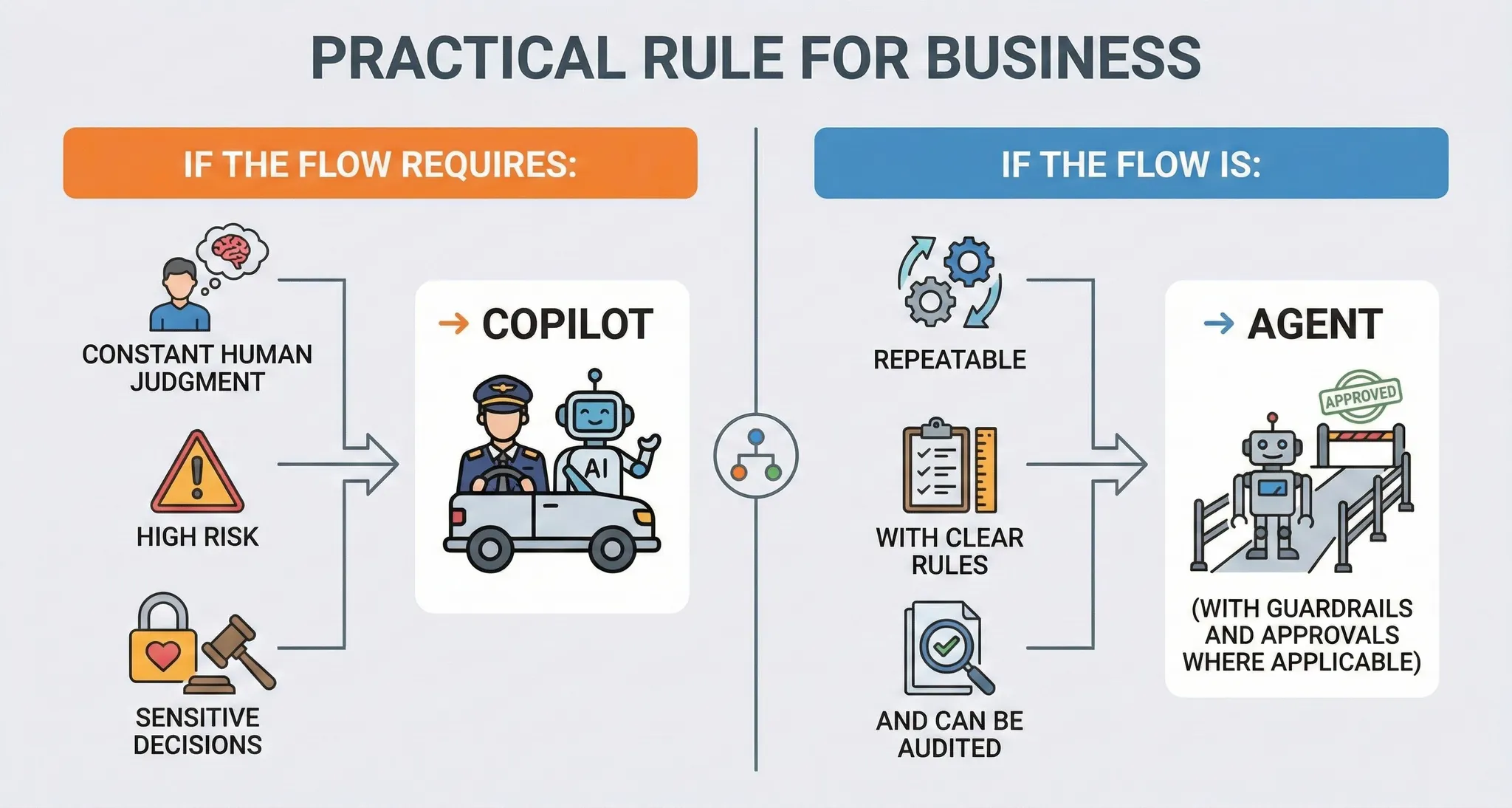
To answer this question, you need to evaluate how much autonomy you require and the potential risks involved. If your team needs support analyzing information, writing, or making decisions—while keeping control over every step—then an AI Copilot tailored to your needs is the right choice.
If what you need is to automate a repeatable workflow—such as following up on leads, handling frequent tickets, or updating records in a CRM or ERP—then you need an AI Agent with rules, permissions, traceability, and clearly defined approval points.
What are the risks of integrating AI Agents?
Integrating AI Agents into your workflow can introduce risks if you don’t have guidance from a specialist, since AI Agents have the ability to act on systems and processes. Like any AI, they can produce hallucinations or misunderstand the context, and they can also cause operational errors when working with incomplete data. There can also be security or privacy risks if an AI Agent accesses sensitive information without a strict permissions model.
On the technical side, poor integration can lead to data leaks, fragile dependencies between tools, or unexpected costs due to API usage.
At this point, you may be questioning whether it’s feasible to integrate AI Agents into your business—but there’s no need to panic. These issues typically come from unclear boundaries, programming mistakes, or knowledge gaps. That’s why it’s important to have expert guidance throughout the process.
I want to automate my business—what should I do?
If you want to automate your business, the most common mistake is starting where we think it will work, without clarity on processes, data, and priorities. At BluePixel, we analyze your operating chain and processes to identify opportunities to implement AI in a measurable way.
If you want to run an initial diagnostic, follow these steps:
1) Define what you want to improve
Choose 1 to 3 concrete goals: reduce response times, speed up sales, lower operational errors, improve collections, etc. This is where AI consulting fits in—turning use cases into ROI and deciding when an AI Copilot vs. an AI Agent makes the most sense.
2) Map your processes and identify real friction
Document your current workflow (inputs, owners, tools, exceptions). The most profitable automation usually lives in support, sales, back office, operations, and reporting.
3) Organize data and systems so AI can operate
AI can’t execute if it doesn’t have reliable access to your source of truth (CRM/ERP/Helpdesk/DB). This is where integration work comes in: connecting APIs, defining permissions, data quality, and rules. Ideally, an expert should guide you through this step.
4) Choose the solution: AI Copilots, AI Agents, or both
- AI Copilots when you want assistance and human control (writing, analysis, prioritization, drafts).
- AI Agents when you want automated execution with clear boundaries (tickets, follow-ups, CRM updates, coordination between tools).
In short: first define the strategy (what to automate and why), then the integration (which systems and data), and finally the execution (AI Copilots/AI Agents with governance). As we mentioned earlier, the ideal approach is to have an expert accompany you throughout the process so everything runs smoothly with minimal risk.
If you’re already thinking about automating your company’s processes by integrating AI Agents or AI Copilots, contact us—we’ll be happy to advise you.
FAQ: AI Enablement (AI Agents & AI Copilots)
1) What is an AI Agent in a company (in a few words)?
An AI Agent is an artificial intelligence designed to achieve a specific goal and execute actions within your processes (for example, in a CRM, ERP, or helpdesk), following rules, permissions, and traceability to operate in a controlled way.
2) How is an AI Agent different from ChatGPT or other generic AI tools?
ChatGPT is a general tool for conversation or for helping with writing/analysis. An AI Agent is integrated with your systems, has defined objectives, uses tools (APIs), and operates with rules and permissions—allowing it to perform real tasks (creating tickets, updating data, following up, etc.).
3) Which is better: an AI Copilot or an AI Agent?
It depends on the level of autonomy you need. An AI Copilot assists and you decide each step; an AI Agent can execute repeatable processes with limited autonomy. At BluePixel, we typically recommend an AI Copilot when decisions are sensitive, and an AI Agent when the workflow is measurable, repeatable, and auditable.
4) How do I know if my company is ready to automate with AI?
If you have repeatable processes (support, sales, operations, reporting) and data available in tools such as a CRM/ERP, you already have a foundation. If data is scattered or the process changes constantly, the best approach is to start with a diagnostic and establish a clear “source of truth” before automating.
5) What are the best processes to start with?
Those with high volume and clear rules:
- Customer service (frequent tickets, FAQs, order status)
- Sales (lead qualification, follow-up, scheduling)
- Back office (data entry, basic reconciliations, internal requests)
- Reporting (data consolidation and alerts)
6) What are the main risks of integrating AI Agents?
The most common are: incorrect actions due to misinterpretation, errors caused by incomplete data, unauthorized access to sensitive information, lack of auditability, and unexpected costs if integrations and API usage aren’t controlled.
7) How do you minimize those risks?
With design and governance: least-privilege permissions, guardrails (allowed actions), traceability (logs), validations before writing data, human approval for critical steps, and monitoring with metrics and alerts. BluePixel implements these controls as part of AI Enablement.
8) Do I need to replace my systems (CRM/ERP) to use AI Agents?
Not necessarily. In most cases, AI Agents can be integrated on top of what you already use through APIs or connectors. The key is defining what data is queried, what actions are allowed, and how data quality and security are maintained.
9) How long does it take to implement AI automation?
It depends on scope. A well-defined pilot can be ready in a few weeks if the process is clear and the integrations are available. If you need to organize data, unify sources, or redesign workflows, it will take longer. That’s why it’s best to start with a focused use case.
10) What results can I expect (real benefits)?
Typically: faster response times, less rework and fewer errors, quicker lead follow-up in sales, improved SLA/CSAT, and freeing up team hours for more strategic work. Impact is measured with KPIs from the start.
11) Does this replace my team?
It’s not meant to replace your team, but to remove repetitive load. The most effective approach is usually a hybrid model: AI Copilots to support decisions and AI Agents to automate repeatable tasks, with escalation to humans for exceptions.
12) How can BluePixel help with AI Enablement?
BluePixel can support you from diagnosis to implementation: consulting to identify use cases and ROI, workflow design, integration with your systems, development of AI Copilots and AI Agents, and go-live with security, monitoring, and continuous improvement.


.png)