



Most product teams adopting AI in UX design processes are asking the wrong question. They ask: "How can AI help us design faster?" The more consequential question is: "How can AI make our product learn from user behavior and deliver better outcomes over time?" These are not the same question, and the distinction defines whether a company is adding tools to its design workflow or building a fundamentally more intelligent product.
This article is about the second question — and why product leaders at mid-market and enterprise companies need to understand the difference before committing resources to any AI-in-UX initiative.
Key Takeaways
- AI UX design is a product architecture decision, not a tooling choice. The distinction between AI-assisted design and AI-integrated UX determines whether AI generates operational value or just reduces designer hours.
- The measurable business case is real: AI personalization has been linked to revenue increases of 10–15% and cost reductions of 15–20% in enterprise deployments (McKinsey).
- Behavioral data quality is the rate-limiting factor. AI cannot reduce friction it cannot observe. Most products need a UX audit and behavioral baseline before AI integration adds value.
- Three layers drive the most impact: behavioral intelligence, adaptive personalization, and automated research — in that order of implementation maturity.
- The correct sequence is: UX audit behavioral baseline AI integration. Skipping steps produces AI features that perform inconsistently and erode user trust.
- Risk management is part of the strategy. Over-automation, black-box UX decisions, and latency introduction are predictable failure modes that should be designed against from the start.
What Is AI UX Design? (Beyond the Design Tool Narrative)
AI UX design is the practice of embedding machine learning and behavioral intelligence into the product experience layer so that the interface learns from real user actions, reduces friction proactively, and improves measurable outcomes over time. It is a product architecture decision — not a feature addition and not a workflow accelerator for designers.
This distinction matters because the conversation around AI in design has been dominated by one use case: tools that help designers work faster. Midjourney for concept visualization. Figma AI for layout suggestions. Copilot-style autocomplete for front-end code. These are legitimate productivity gains. They are not AI UX design.
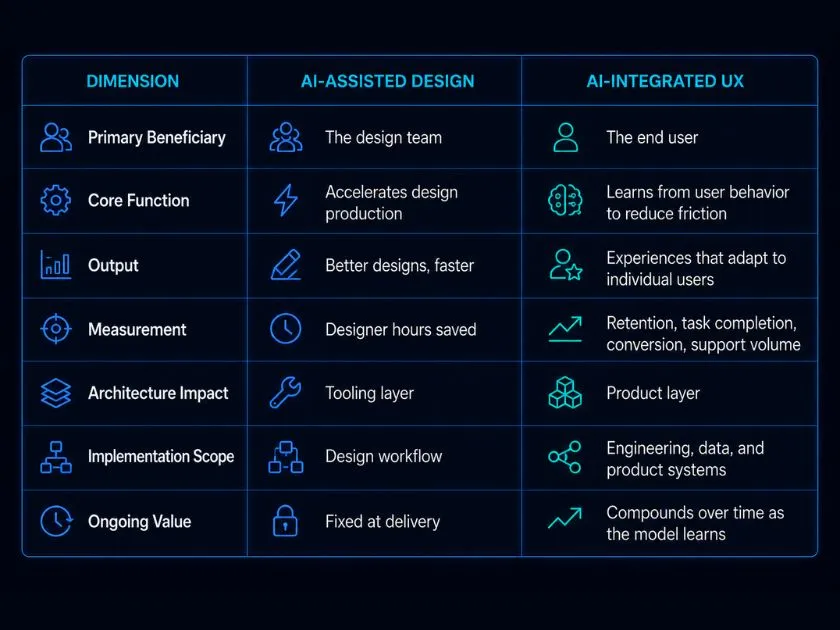
AI-integrated UX means the product itself becomes more capable the more it is used. Navigation paths adapt to demonstrated behavior. Onboarding flows route users based on their role, history, and interaction patterns. Error surfaces predict where users are likely to struggle and preemptively simplify. These capabilities do not come from a design tool. They require behavioral data pipelines, model infrastructure, and deliberate UX architecture built with AI as a core layer — not an afterthought.
The Three Layers Where AI Changes the UX Equation
AI changes the UX equation at three distinct levels of the product stack. Understanding which layer an initiative operates at determines the right investment, the right metrics, and the right implementation sequence.
Behavioral Intelligence: Learning What Users Actually Do
Behavioral intelligence is the foundation. It refers to systems that capture, model, and act on granular user behavior — not just page views or click events, but sequences, hesitations, abandonment patterns, and task completion paths at the individual and cohort level.
Traditional analytics tells you what happened. Behavioral intelligence tells you why it happened and predicts where friction will occur next. At production scale, this means an AI layer that continuously maps the delta between intended user paths (how the product was designed to be used) and actual user paths (how it is being used) — and surfaces that gap as actionable signal.
This is the architecture underlying BluePixel's IMPATH system, which builds 7-layer behavioral profiles for each user segment: capturing not just actions but context, intent signals, task load, and pattern deviations. The output is not a report — it is a live input into the product experience layer that informs what the interface shows, hides, or simplifies in real time.
Before any adaptive personalization or automated testing is meaningful, behavioral intelligence infrastructure needs to be in place. You cannot reduce friction you cannot observe.
Adaptive Personalization: Adjusting the Experience to the User
Adaptive personalization moves beyond static segmentation. Where traditional personalization assigns users to a predefined group and shows them pre-configured content, adaptive personalization adjusts the experience dynamically based on demonstrated behavior, contextual signals, and historical interaction patterns.
In practice, this means navigation that reorganizes around the tasks a user performs most frequently. Onboarding flows that skip steps when behavior signals existing competency. Dashboard modules that surface the data a specific user consistently queries rather than defaulting to the same view for every role. These are not cosmetic changes. They directly reduce cognitive load, accelerate time-to-task, and improve adoption metrics across user segments.
The business impact scales with the sophistication of the personalization model — but the architectural requirement scales with it. Adaptive personalization requires clean behavioral data, a model trained on sufficient interaction volume, and a product layer designed to accept dynamic inputs rather than rendering static layouts.
Automated Research and Testing: Compressing the Discovery Cycle
The third layer addresses a structural bottleneck in traditional UX practice: the time and resource cost of research cycles. Manual usability testing, qualitative synthesis, and friction analysis are high-value activities that typically cannot scale with product velocity.
AI compresses this cycle in two ways. First, pattern recognition at scale — AI systems can analyze thousands of session recordings, identify interaction anomalies, and cluster behavioral patterns faster than any manual review process. Second, predictive friction modeling — instead of discovering friction after it causes abandonment, AI models trained on behavioral baselines can flag interface areas likely to cause problems before they are observed in the wild.
This shifts the research function from reactive to proactive. Product teams spend less time investigating what broke and more time optimizing what can be improved.
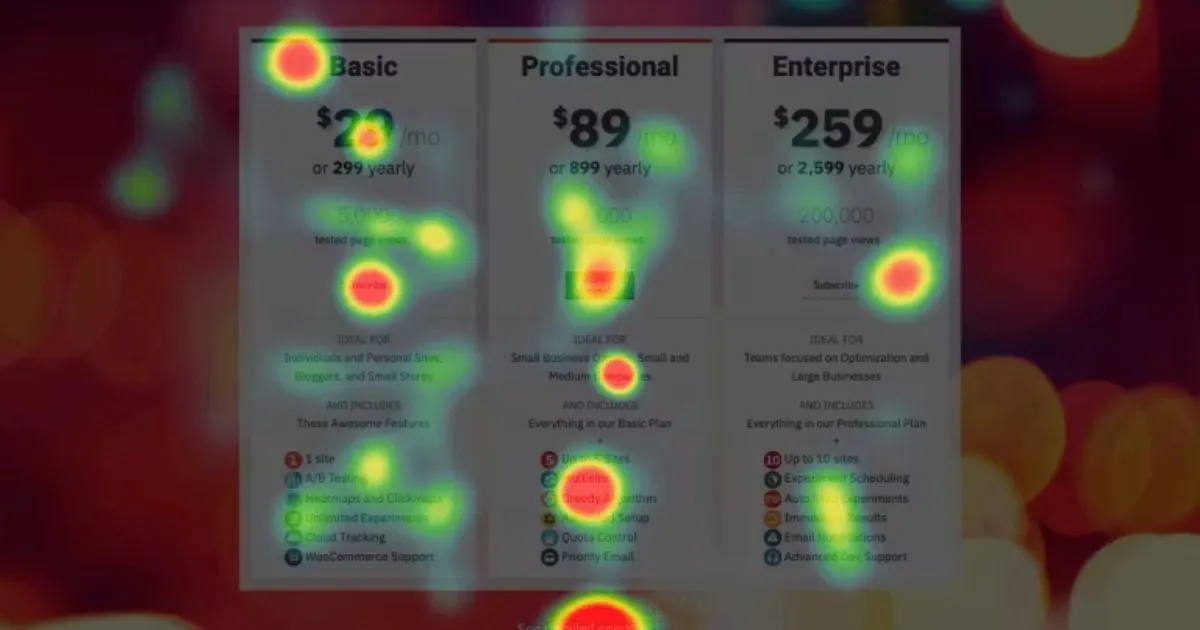
Until now, heatmaps were the go-to method for detection.
Where AI Delivers Measurable Business Impact in UX
The business case for AI-integrated UX is not theoretical. The evidence is specific, measurable, and consistent across industries.
McKinsey's research on AI personalization at scale found that companies implementing AI-driven personalization in their product and service layers achieved revenue increases of 10–15% and cost reductions of 15–20%. These figures reflect outcomes in companies that implemented personalization as a product architecture decision — not as a marketing personalization layer on top of a static experience.
Cart abandonment data from Baymard Institute, which tracks the largest continuously updated dataset of checkout behavior, shows a 70.19% average abandonment rate across e-commerce. Their research consistently attributes the primary driver not to price sensitivity or competitive alternatives, but to UX friction: unnecessary steps, unclear error states, form complexity, and forced account creation. AI-driven friction detection and adaptive simplification address these drivers structurally rather than incrementally.
Gartner's research on AI adoption in product teams projects that by 2026, 80% of enterprise product teams will have integrated at least one AI-powered UX capability — covering a range from simple behavioral analytics integrations to fully adaptive interface layers. The question for enterprise leaders is no longer whether to integrate AI into the product experience. It is whether to do it with intentional architecture or reactive adoption.
Google's Core Web Vitals research adds another dimension: sites meeting Core Web Vitals thresholds are 24% less likely to be abandoned mid-visit. AI-powered performance monitoring that continuously measures and optimizes experience quality metrics — not just at launch, but in production — feeds directly into this outcome.
BluePixel's AGENTIC practice operates at this intersection — identifying where behavioral AI, automated optimization, and intelligent workflows can be integrated into the product layer to generate measurable operational and commercial outcomes. The entry point is always a specific metric to move, not a technology to adopt.
AI in UX Research: From Insight to Roadmap in Less Time
Traditional UX research operates in cycles. A team identifies a hypothesis, designs a study, recruits participants, runs sessions, synthesizes findings, and converts insights into roadmap priorities. Done well, this process takes weeks. Done at enterprise scale — across multiple products, markets, and user segments simultaneously — it is either resource-intensive or abbreviated in ways that reduce its reliability.
AI compresses the cycle at three points.
Pattern recognition at scale. Tools like Hotjar AI and Mixpanel's AI layer can surface behavioral anomalies, identify friction hotspots, and cluster user segments based on interaction patterns in minutes rather than days. A team that previously needed to manually review session recordings to identify where
users lost confidence in a checkout flow can now receive that signal automatically, continuously, and with statistical significance across the full user base rather than a small research sample.
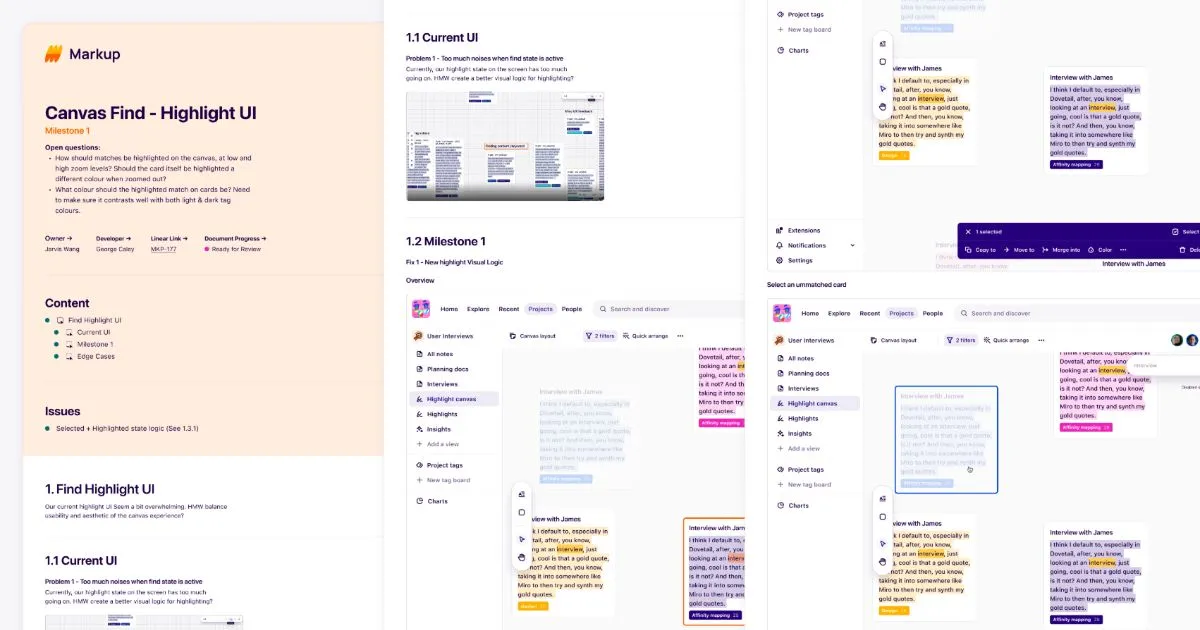
Qualitative synthesis acceleration. Tools like Dovetail and Maze apply AI to qualitative data — tagging themes across interview transcripts, clustering verbatim responses, and surfacing recurring patterns without requiring a researcher to manually code hours of session recordings. This does not replace the interpretive judgment of an experienced researcher, but it dramatically accelerates the mechanical work and allows research teams to focus on insight generation rather than data processing.
Predictive friction modeling. Rather than discovering friction after it drives abandonment, AI models trained on behavioral baselines can identify interface areas statistically correlated with task failure or dropout — before the pattern becomes a crisis. This is the shift from reactive to proactive UX optimization.
BluePixel's IMPATH system applies this at the research layer through its Interview Room capability, which enables parallel behavioral analysis across up to 7 stakeholder sessions simultaneously — extracting pattern data from qualitative interactions at a scale that traditional research infrastructure cannot support. The output feeds directly into UX optimization priorities with behavioral evidence rather than anecdote.
Before research automation yields reliable signal, however, the product needs a stable behavioral baseline. An AI system trained on noisy or sparse data produces unreliable insights. This is why the correct entry point for most enterprise teams is a structured UX audit before any AI research tooling is introduced.
Personalization at Scale: When AI Adapts the Experience to the User
Personalization has a spectrum. At one end: changing the hero image based on a user's stated industry. At the other end: dynamically restructuring the entire experience — navigation, onboarding path, information architecture, feature surface — based on a user's demonstrated behavior, role, and contextual history.
The first is marketing personalization. The second is structural personalization. The distinction is not cosmetic. Structural personalization requires AI as a product layer, not a content management configuration.
The business impact difference is also significant. Marketing personalization moves engagement metrics marginally. Structural personalization moves retention, activation, and task completion rates in ways that compound over time as the model learns the user base.
Consider a concrete example: an enterprise operations dashboard serving three distinct user roles — finance, operations, and executive leadership. All three roles are served by the same product, but their workflows are fundamentally different. A traditional implementation gives each role a pre-configured view, requiring significant onboarding investment and producing frequent misalignment as user needs evolve faster than manual configuration cycles allow.
An AI-integrated approach continuously observes which modules each user actually accesses, in what sequence, and with what frequency — then reorganizes the interface to surface the most relevant information for that user's actual workflow, not their assigned role. In implementations following this approach, task completion time reductions of 20–25% are consistently achievable without structural redesign, because the interface stops requiring users to navigate to information and begins routing information to users.
One critical failure mode worth flagging: personalization that increases cognitive load rather than reducing it. This happens when AI-driven personalization introduces inconsistency — when the interface changes in ways the user did not expect and cannot predict, breaking their mental model of how the product works. AI personalization that produces interface instability undermines the trust and confidence it was designed to create. The design principle: adapt context and surface, not structure and navigation patterns.
The Risks of AI in UX — and How to Evaluate Them
A credible assessment of AI-integrated UX includes the risk profile. Teams that engage with AI capabilities only through their upside tend to implement poorly, encounter predictable failures, and conclude that the technology did not deliver — when the issue was the implementation, not the capability.
Over-automation. The most common failure mode. Teams automate too many UX decisions simultaneously before establishing behavioral baselines, producing interfaces that change in ways that confuse users rather than serving them. The mitigation: implement AI personalization incrementally, validate each layer against retention and task completion metrics before extending scope.
Black-box UX. When AI makes interface decisions that designers and product managers cannot explain, the product team loses the ability to debug, improve, or take accountability for the user experience. AI-driven UX decisions need to be auditable — with clear visibility into what signals drove what output, so teams can intervene when the model makes poor decisions. This requires deliberate transparency infrastructure, not just model deployment.
Accessibility failures. AI-adaptive interfaces that reorganize layout, change visual hierarchy, or dynamically modify interaction patterns can inadvertently break accessibility compliance. Screen reader compatibility, keyboard navigation, and WCAG standards need to be enforced as constraints on the personalization layer — not treated as post-implementation checks.
Latency introduction. AI inference adds processing time. An adaptive interface that requires a model call before rendering creates latency that directly degrades perceived performance. The Baymard research referenced above is consistent with a broad body of evidence linking interface speed to abandonment. AI-driven personalization needs to operate within strict performance budgets, with static fallbacks for cases where inference cannot be completed within acceptable latency thresholds.
Understanding these risks is not a reason to avoid AI integration. It is a reason to approach it with implementation discipline — which is what distinguishes companies that generate measurable outcomes from those that accumulate AI features without measurable return.
Building the Business Case for AI-Integrated UX
For product leaders building internal alignment around AI-integrated UX investment, the case needs to be framed in metrics that map to business outcomes, not technology sophistication.
Metrics to track from day one:
- Task completion rate by user segment and flow
- Time-to-task for core workflows
- Support ticket volume related to navigation and usability
- Session abandonment rate at friction-heavy points
- Feature adoption rate across user cohorts
- Retention rate at 7-day, 30-day, and 90-day intervals
ROI modeling framework:
Start with the friction cost. Identify the top three flows where users abandon, require support, or fail to complete the intended task. Quantify the business cost of that failure — in support hours, lost conversion, or delayed adoption. Then model the revenue or efficiency impact of a 10–15% improvement in those specific metrics, which is a conservative improvement target for AI-integrated friction reduction based on published McKinsey data.
This reframes the investment from "AI UX budget" to "cost of friction reduction" — a frame that resonates more directly with CFO and executive stakeholders than technology capability positioning.
Implementation sequence:
The correct sequence for most enterprise teams is: establish behavioral baseline → identify highest-impact friction points → implement AI-driven improvements against specific metrics → expand scope based on measured outcomes. Teams that skip the baseline phase cannot measure impact, cannot debug failures, and cannot make the case for continued investment.
If you are evaluating how AI can be integrated into your product experience layer with measurable outcomes, BluePixel's AUTOMATE practice is designed for exactly that conversation — beginning with operational context and ending with a scoped implementation tied to specific business metrics.
How to Evaluate Whether Your Product Is Ready for AI UX Integration
Not every product is positioned to benefit from AI UX integration today. Readiness assessment should precede any scoping or vendor conversation.
Three signals of readiness:
- Behavioral data quality. The foundational requirement. AI systems that learn from user behavior can only be as reliable as the behavioral data they train on. If your product does not have granular event tracking — capturing specific interactions, sequences, hesitation patterns, and drop-off points — you do not yet have the input layer that AI-integrated UX requires. Instrumentation gaps are the single most common reason AI UX initiatives underdeliver. Before evaluating AI capabilities, assess whether your current analytics infrastructure captures behavior at the resolution the intended model requires.
- Core product stability. AI personalization adds a layer of dynamic behavior on top of the existing product. If the underlying product is structurally unstable — with frequent layout changes, inconsistent navigation patterns, or unresolved usability issues — the AI layer will amplify the problem rather than solving it. AI adapts to patterns; if the patterns are incoherent, the adaptations will be too.
- Defined use case with measurable outcome. "We want to integrate AI" is not a use case. "We want to reduce task completion time for the reconciliation workflow by 20% for our finance user segment" is a use case. Specificity in use case definition is directly correlated with the quality of implementation and the reliability of outcome measurement.
Warning signs that AI features are likely to fail:
- No behavioral analytics instrumentation beyond page views and session duration
- Core navigation or IA has unresolved usability issues that generate consistent user complaints
- No defined owner for the AI layer post-launch (model monitoring, retraining, performance tracking)
- The AI initiative is being scoped as a feature launch, not as a product capability with ongoing governance
The right starting point before any AI integration engagement is a structured UX audit that establishes the behavioral baseline, identifies friction priorities, and confirms whether the product architecture can support the intended AI layer. BluePixel's UX audit and optimization services are designed specifically to establish this foundation — assessing usability, behavioral data quality, and technical readiness in a structured engagement that produces a prioritized AI integration roadmap.
Frequently Asked Questions About AI UX Design
What is the difference between AI-assisted design and AI-integrated UX?
AI-assisted design refers to tools that help designers work more efficiently — generating concepts, suggesting layouts, or automating repetitive tasks in the design production process. The beneficiary is the design team, and the output is better designs delivered faster. AI-integrated UX refers to product architecture where AI capabilities are embedded into the user-facing experience layer — the product itself learns from user behavior, adapts to individual patterns, and proactively reduces friction. The beneficiary is the end user, and the output is measurable improvements in retention, task completion, and conversion over time. The distinction is architectural, not cosmetic: AI-assisted design is a workflow tool; AI-integrated UX is a product capability.
How do I know if my product is ready for AI UX integration?
Readiness for AI UX integration requires three conditions: clean behavioral data (granular event tracking that captures user interaction sequences, not just aggregate metrics), a stable core product (no major unresolved UX issues that would be amplified rather than resolved by an adaptive layer), and a specific use case with a measurable outcome target. The most reliable way to assess readiness is through a structured UX audit that evaluates behavioral data quality, identifies friction priorities, and confirms whether the current product architecture can support an AI integration layer. BluePixel's UX audit services provide this assessment as a defined engagement.
Does AI in UX replace UX designers?
No — and the distinction is important to understand correctly. AI-integrated UX expands the surface area of what UX designers can influence, but it does not replicate the functions that make UX design valuable: problem framing, behavioral interpretation, systems thinking, and the judgment to distinguish a pattern from a signal. AI can identify where users are abandoning a flow. It cannot determine whether the solution is a navigation change, a content clarification, or a fundamental rethinking of the task model. That interpretive and strategic work remains the domain of experienced UX practitioners. What AI changes is the scale at which behavioral evidence is available to inform those decisions — and the speed at which improvements can be deployed and measured.
What metrics should I track to measure the ROI of AI-driven UX improvements?
The most reliable ROI metrics for AI-integrated UX are behavioral outcomes tied to business value: task completion rate for core workflows, time-to-task for high-frequency user actions, session abandonment rate at specific friction points, support ticket volume related to usability, feature adoption rate by user segment, and retention rates at 7, 30, and 90-day intervals. Vanity metrics — engagement rate, session duration, page views — do not provide reliable signal for AI UX ROI because they conflate positive engagement with friction-driven extended time-on-task. Establish baseline measurements for each target metric before implementation begins. Post-implementation impact is only attributable when there is a clean pre/post baseline.
How long does it take to see results from AI UX integration?
The timeline depends on three variables: the quality of behavioral data available at the start, the scope of the AI integration, and the volume of user interactions available to train and validate the model. For well-instrumented products with defined use cases and sufficient interaction volume, initial measurable improvements in task completion and friction metrics are typically observable within 60–90 days of a production deployment. For products that require behavioral baseline establishment before AI integration can begin, the realistic timeline to measurable outcome is 4–6 months from project start. Implementations that skip the baseline phase often report inconclusive results because there is no pre-implementation measurement against which to evaluate change.
The Compounding Advantage of Getting This Right
The case for AI-integrated UX is ultimately about compounding returns. A product that learns from every user interaction becomes more valuable over time — reducing friction that accrues to customer satisfaction, increasing task efficiency that accrues to retention, and surfacing behavioral intelligence that accrues to better product decisions.
The companies that will operate with a durable competitive advantage in digital products are not the ones that adopted AI tools fastest. They are the ones that built AI-integrated product architectures deliberately
— with behavioral baselines, measurable outcomes, and implementation discipline — before their competitors understood the distinction.
The entry point is almost always the same: understand your current behavioral reality before designing your AI-integrated future. A structured UX audit establishes both the baseline and the roadmap.
If your team is evaluating where AI fits in your product experience strategy, BluePixel's AGENTIC practice works with product leaders to identify high-impact integration opportunities and build the measurement infrastructure to prove the outcome. The conversation starts with your specific product — not with a technology pitch.


.png)