

.webp)
Many companies wonder how to optimize their website when they face an obvious problem: a drop in traffic, fewer prospects (leads), or poor performance in paid campaigns.
But the strategically correct question should be a different one:
How much is it costing us not to optimize? How many sales are we losing? How many prospects have we lost?…
Because today, websites are no longer a secondary asset. They’re the center of the digital ecosystem. It’s where everything converges:
- Organic traffic
- Paid campaigns
- Social media
- Email marketing
- Public relations
- Brand
- Reputation
That means that when the site isn’t optimized, your entire digital strategy gets weaker.
From the perspective of a company specialized in website development and optimization like BluePixel, optimization shouldn’t be an isolated technical effort, but an end-to-end process—because it directly impacts:
- Revenue
- Acquisition cost
- Advertising ROI
- Brand authority
- And a company’s commercial efficiency
With this common “pain” that many businesses experience in mind, we created this guide for decision-makers, executives, digital leaders, and professionals who need clarity to decide whether they should intervene on their most important digital asset.
1. What are the signs that your website needs optimization?
Before we talk about tools and checklists, we want to talk about the structural symptoms:
A website doesn’t need optimization just because it “looks old.”
It needs it when it’s no longer aligned with the company’s business strategy.
1.1 A decline in key metrics
There’s a saying: “metrics don’t lie, but they do require strategic interpretation.” These are the most common signs that your website needs a refresh:
- Organic traffic drops, meaning the number of visits coming to your site naturally goes down, whether because they saw your ad and then searched for you on Google, because someone recommended your brand, or because they searched for the products or services you offer and you appeared in search results.
- Keyword stagnation. When you use keywords to attract people who don’t know your brand but are searching for what you offer, and you notice your site is no longer showing up for certain queries, or it’s drifting farther from the top results.
- Lower average time on page. If you haven’t made dramatic changes to your site, but visitors are spending less time than they used to, it’s time to ask whether the information you provide is still current, relevant, and useful.
- Higher bounce rate. A high bounce rate doesn’t necessarily mean a website is ineffective, but you should take action if you see fewer and fewer people completing the actions you want, like buying your products, registering for your webinar, or filling out a form to request a quote.
- Fewer prospects (directly related to the previous point).
- When cost per acquisition increases and starts affecting the efficiency of your ad spend.
When these metrics show sustained deterioration over 3 to 6 months, we’re no longer talking about fluctuations—we’re talking about a structural problem.
1.2 Organic traffic is flat or declining
Organic traffic is one of the most valuable assets a company can have in the digital environment. Why?
- Because you don’t need to pay every single day to exist.
- It doesn’t shut off when you pause ad spend.
- Its cost doesn’t rise every time a competitor invests more money.
It’s the visibility you build through the content on your digital channels.
And it’s so important that some studies estimate that more than 50% of global traffic comes from organic searches. That’s why when organic traffic stalls or starts to drop, it’s a warning sign.
What does it really mean for your traffic to be “stagnant”?
It’s not always a dramatic drop; sometimes the issue is quieter. Think about these scenarios:
Scenario 1: Your traffic doesn’t grow
- The market keeps growing.
- Demand still exists.
- Your competitors start showing up more.
But you stay the same.
That means you’re not benefiting from the market’s growth.
Scenario 2: A slow but steady decline
Month after month, you lose a bit of traffic. Nothing alarming. Nothing panic-worthy. But after a year, the loss becomes significant.
This kind of decline is often due to:
- Competitors with better-optimized sites.
- Outdated content.
- Pages that no longer match what users are looking for.
- Lack of strategic maintenance.
It’s like a machine that still runs—but with less efficiency every time.
Scenario 3: Traffic is “fine,” but it’s not ideal for your goals
Total volume stays stable, but when you dig deeper, you find that:
- Most of the traffic comes from people who already know your brand.
- You’re not capturing new searches.
- You don’t have enough visits to reach the number of monthly sales or leads you need to hit your revenue targets.
- Your key pages are losing rankings.
That means your company isn’t expanding its reach—it’s only being found by people who already knew you. And that doesn’t create growth.
What happens when your rankings drop?
When you start losing positions in search engines, three things happen:
- You lose visibility
If you used to be in the top results and now you’re on page two, you’ve essentially disappeared.
In industrial markets, where each opportunity can represent major contracts, that invisibility is expensive.
- Your authority weakens
The market interprets something very simple: “If this company doesn’t show up when I search for key solutions, it probably isn’t a leader in its sector.”
Even if that isn’t true. In the buyer’s mind, digital visibility translates into solidity.
- Your acquisition cost increases
If you lose organic traffic, you need to make up for it. How?
- More ads.
- More campaign spend.
- More pressure on the sales team.
And that directly impacts business margin. It’s a domino effect.
How to detect the problem before it impacts sales
A fundamental tool is Google Search Console. We suggest taking the time to understand what these metrics mean:
- Impressions. They show how many times you appear in search results. If they drop, it means you’re showing up less.
- Clicks. These are the actual visits from Google. If they drop, it means something changed in your relevance—or in your competitive landscape.
- Click-Through Rate (CTR). The percentage of people who click to visit your website when you appear in search results. If you show up but no one clicks, the problem may be:
- Unclear titles.
- Generic messaging.
- Lack of differentiation vs. competitors.
- Ranking keywords. It’s not how many you have, but which ones. If you rank for overly generic content, you’ll attract people looking for information—not necessarily potential buyers. For example:
- “What is industrial automation” generates traffic.
- “Industrial automation provider in Monterrey” generates business.
- Pages losing positions. This is the red alert. If your main service pages drop, you’re losing opportunities directly tied to revenue.
Explore Search Console as much as you can. We’re sure it’ll open your eyes in many ways—from understanding which pages get the most visits on your site, to which search terms drive the most traffic.
1.3 Low conversion rate
Many people make the mistake of thinking that high traffic equals success. But there is no success without sales. A site can get thousands of visits and generate very few results.
Specialists say these are average conversion rates:
- B2B (business to business): 1%–3%
- Ecommerce: 1.5%–4%
If you’re well below your industry’s average, the problem might be:
- Your value proposition isn’t clear enough.
- Your digital platform design is focused on aesthetics, not conversion.
- Calls to action aren’t visible or are ambiguous.
- Forms are too long (and unnecessarily so).
- What people see in the paid ad or search result doesn’t match what they see once they land on your website.
You might be interested in reading: 6 strategies to boost conversions on your website
1.4 Slow load time
Speed is a technical factor, but also a psychological one. Digital industry data shows that:
- If a page takes more than 3 seconds to load, visitor abandonment increases significantly.
- Every additional second can reduce conversions by 4% to 7%.
Also important: Google considers load speed a ranking factor.
In that sense, we suggest evaluating your site performance using PageSpeed Insights and GT Metrix. Here’s a great tutorial from Rank Math SEO:
2. Your competitors are more visible
There’s a very simple exercise that many professionals almost never do: open Google and search for what your company sells. We’re not talking about searching your brand name or slogan, but real terms like: “industrial packaging manufacturer,” “food machinery in Mexico,” “hydraulic spare parts supplier,” or “lean manufacturing consulting.”
If you do this exercise multiple times and consistently see your competitors in the top results—but not your company—it’s a clear sign: your competition is capturing the attention of potential customers who are searching for what you offer.
And in business terms, that’s a direct competitive advantage.
SEO optimization is essential
If you have a “good” or “decent” site, but your competitors’ sites are clearer, more specific, and more complete, Google’s algorithm (and every other search engine) will make a decision: give those competitors more visibility.
If others dominate the strategic searches that matter to your brand, ask yourself:
1️⃣ Do they have more content or better information?
Don’t focus only on word count—look at depth and clarity too.
For example, imagine an industrial website with generic pages like “Our Solutions,” while their competitor has:
- One page for each industry they serve.
- One page for each specific application.
- Detailed success cases.
- Technical articles explaining real problems.
- Downloadable guides.
- Solution comparisons.
If a prospect is searching for a specific solution, who do you think will inspire more confidence: the one with a generic page, or the one with specialized content for that specific scenario or problem?
2️⃣ Is their site structure clearer?
Many sites grow over time without a strategic architecture. They end up with duplicated sections, mixed services, confusing menus, and hidden information.
Meanwhile, competitors organize their site like this:
- Solutions by industry.
- Solutions by type of problem.
- Processes explained step by step.
- Clearly differentiated benefits.
- Clear, logical product categories, etc.
A clear site doesn’t just help users—it also helps Google understand exactly what the company does. If the search engine understands what the website is about, it will favor it in search results.
3️⃣ Is their value proposition more specific?
Think of a company that says something generic like “We are leaders in end-to-end solutions,” without realizing that message doesn’t communicate anything concrete.
Meanwhile, their competitor says: “We reduce production line downtime by up to 30% through specialized predictive maintenance.”
That communicates real value.
If your proposition is generic and your competitor’s is concrete, the market will lean toward whoever reduces uncertainty.
4️⃣ Do they publish and update their website constantly?
Don’t forget the world is constantly changing. Industries shift, online searches evolve, and needs change.
If your site hasn’t been updated in years and your competitors publish new articles, recent success cases, industry trends, innovations, and more, it’s clear they have the advantage because they stay active.
And in industries where innovation and trust matter, that carries a lot of weight in the consumer’s eyes.
2.2 When the competition offers a better user experience
Remember: today, users don’t analyze a page for minutes. They scan and decide almost immediately. They visit your site, visit competitors’ sites, compare in seconds, and make a preliminary decision.
It’s not always a conscious decision—but it is fast.
If another competitor explains things better, simplifies processes or paperwork, and makes immediate contact easier, they have the advantage.
Before, the competitive advantage was based on:
- Price.
- Capacity.
- Location.
- Distribution network.
Those factors still matter, but now digital experience has been added—because it influences decisions even before sales gets involved.
What makes users prefer the competition?
Let’s look at the most common factors:
1️⃣ They explain information better
Many companies write for themselves, not for their customers: they use overly technical language, don’t explain the problem they solve, and talk about internal processes instead of showing results achieved for clients.
The competitor, on the other hand:
- Explains the problem.
- Presents the solution.
- Shows clear benefits.
- Answers FAQs.
When users understand better, they trust more. And when they trust more, they move forward in the decision-making or buying process.
2️⃣ They simplify processes
If users have to:
- Fill out long forms.
- Search for hidden information.
- Download PDFs to understand the service.
- Navigate multiple confusing sections.
There will be friction.
But if the competitor:
- Clearly summarizes their offer.
- Shows simple steps.
- Explains what the working process looks like.
- Reduces unnecessary form fields.
The decision will favor the option that makes life easier.
3️⃣ They show social proof (success cases, tangible results)
Trust is everything. If the competitor shows:
- Detailed success cases.
- Real testimonials.
- Brands or organizations they work with.
- Quantifiable results.
- Visible certifications…
They reduce perceived risk, which is often one of the main barriers to buying something or choosing a company.
4️⃣ They make immediate contact easy
There are companies where finding the contact button is practically a mission, and others where the form feels like a bank application.
Meanwhile, competitors offer:
- A clear, visible contact button.
- Clear ways to communicate via email, chat, social media, help pages, or direct messages.
- Fast response.
Which option do you think users will choose?
3. Internal feedback
Sometimes you don’t need an external audit to realize your website needs optimization—the signals are already inside your company: marketing feels it, sales suffers it, and customer service hears it.
The issue is that many times it gets interpreted as a campaign issue, a budget issue, or “market quality,” but the real root could be the website.
And optimizing the site shouldn’t only mean improving design—it also means aligning the message, structure, segmentation, and experience with commercial objectives.
3.1 The marketing team reports low performance
There are phrases that come up constantly in marketing meetings:
- “Traffic comes in, but it doesn’t convert.”
- “The landing page doesn’t reflect the campaign well.”
- “Cost per lead is too high.”
- “We’re paying for clicks that don’t turn into opportunities.”
When this happens systematically, the problem is rarely just paid media. Ads bring interested people to the site, but the page content influences whether they decide to move forward in the buying/decision process.
What’s usually happening?
- The page doesn’t clearly communicate the value proposition.
- The message is generic and doesn’t connect with user intent.
- The content doesn’t fulfill the ad’s promise.
- The form creates unnecessary friction.
- There’s no evidence that builds trust.
3.2 Sales receives poorly qualified leads
Another clear signal comes from the sales team. Comments like:
- “We get a lot of contacts, but few match our ideal profile.”
- “Most don’t have the budget.”
- “They don’t really understand what we offer.”
- “They ask for something we don’t do.”
Here the problem isn’t lead volume—it’s lead quality. And many times, the root is in how the site communicates and segments visitors.
What could be failing?
1️⃣ The message isn’t segmented
If a company offers solutions for different types of clients (for example, manufacturing, construction, and energy), but communicates everything in a general way, it will attract broad, non-specific traffic.
Optimizing the site means speaking clearly to the right profile.
2️⃣ The value proposition is vague
If the site says “We offer comprehensive and customized solutions,” that could mean anything.
But if it says: “We design and implement automation systems for production lines in the food industry,” the filter starts working.
Clarity doesn’t just convert more visitors into leads. It also better filters the leads that reach the sales team.
3️⃣ The site doesn’t filter effectively
An optimized site can incorporate natural filters like:
- Segmentation by industry.
- Segmentation by type of problem.
- Clear scope explanation.
- Project ranges.
- Specific cases, etc.
That helps people who aren’t a fit to self-select out—and that’s a good thing.
The goal of optimizing a website shouldn’t only be to generate more leads, but to generate better commercial opportunities. Because a poorly qualified lead isn’t just a lost sale—it also consumes sales team time.
Especially in industries with long sales cycles, wasting time with the wrong prospects has a high cost.
3.3 Customers report confusion
Another powerful signal comes directly from customer service, who hears comments like:
- “I couldn’t find what I was looking for.”
- “I didn’t understand the difference between your services.”
- “I didn’t know what the next step was.”
- “I had to call for someone to explain it.”
Each of these comments is a direct alert that there are user experience (UX) issues.
What usually causes this confusion?
1️⃣ Unclear architecture
- Services mixed together.
- Scattered information.
- Overloaded menus.
When users have to work too hard to understand what you do, they leave.
2️⃣ Weak differentiation
If you have multiple services but don’t clearly explain:
- Who each one is for.
- In which cases it applies.
- What problem it solves.
- What makes it different.
Users get lost.
3️⃣ Lack of clear guidance
Every site should quickly answer:
- What do you do?
- Who is it for?
- What do I get?
- What do I do now?
If the next step isn’t obvious, users don’t move forward.
4. Strategic changes in the company
Many times the site isn’t “bad”—it’s simply outdated compared to the company’s new reality.
For example, if the company has a new product or service, each new line of business may require:
- Specific keywords
- Dedicated pages for those new products or services
- A commercial and positioning strategy
If the site doesn’t reflect that business evolution, it will lose opportunities.
Another possibility is that the company is expanding into new markets and needs local SEO (search engine optimization). This may require:
- Regional web pages or pages dedicated to a specific location—office, branch, site, etc.—based on geography.
- Geographic optimization
- Local search strategy
- Local authority signals
Because without local optimization, commercial expansion won’t translate into digital expansion.
5. Deeper technical signals
Here we go into a more structural layer. We’re not just talking about visible messaging or design—we’re talking about the technical foundation that supports the site’s performance.
Many companies believe their website “works” because it loads fast and looks good on a computer. But there can be deeper issues affecting ranking, experience, and conversion—without anyone noticing right away.
Website optimization can’t ignore this technical dimension. It’s like an industrial plant: even if the façade looks perfect, if internal systems fail, efficiency drops.
5.1 The site isn’t responsive
Today, more than 60% of web traffic comes from mobile devices. In many industries this percentage can vary, but even in B2B, decision-makers research from their phone before moving into a formal evaluation.
Also, Google uses a mobile-first indexing system, meaning it looks at the mobile version of your site first to determine your rankings.
If the mobile experience is poor, the impact is triple. First, you’ll lose rankings because Google interprets the experience as inadequate. Second, you’ll lose conversions because users will leave if they have to zoom, if buttons are too small, or if forms are hard to complete. Third, you’ll lose credibility—because a site that doesn’t work well on mobile signals that it’s outdated and lacks attention to detail.
In industries where trust is key, a poor mobile experience can create unconscious doubts about a company’s operational quality.
You might be interested in reading: Key principles of responsive design
5.2 Indexing errors
Many performance problems aren’t related to content, but to actual visibility in search engines. Regularly reviewing Google Search Console isn’t optional—it’s part of the basic maintenance of any digital asset.
Some of the most common errors include pages blocked accidentally, coverage issues that prevent certain sections from appearing in results, duplicate URLs that confuse the algorithm, 404 errors that affect experience and authority, and misconfigured sitemaps that make proper indexing harder.
In simple terms: you can have valuable information, but if Google can’t interpret it correctly or can’t crawl it, it’s as if it doesn’t exist. In industries where each strategic search can represent a high-value opportunity, losing visibility due to technical errors is an unnecessary cost.
5.3 Weak architecture
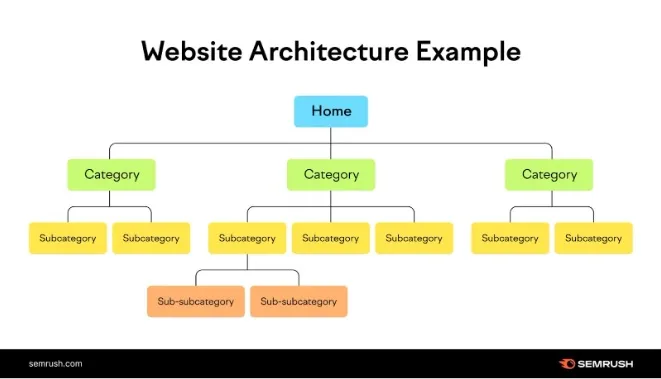
Site architecture is, in short, how all information is organized inside your website. It’s like a building blueprint: if the structure isn’t well thought out, everything you build on top starts to wobble. When this foundation is weak, overall site performance is weak too—even if it doesn’t look that way at first glance.
One of the most common issues is long, tangled URLs that don’t clearly communicate what the page is about. It’s also common for headings (titles and subtitles) to not follow a logical order, making it harder for both people and search engines to understand what’s most important in each section. Add to that a lack of well-planned internal linking between related pages, which makes the site lose strategic strength. And in many cases, multiple pages end up competing with each other for the same search, weakening rankings instead of reinforcing them.
Optimizing websites starts by putting the house in order from the foundation up. When the structure is clear, logical, and strategic, everything else—the content, user experience, and conversion—has solid ground to grow on.
See this SEMrush example:
6. What does it really mean to optimize a website?
Optimizing isn’t redesigning. It’s not changing colors, fonts, or animations to look more modern. Optimization goes much deeper: it’s aligning technology, content, experience, and conversion with measurable business objectives.
An optimized site isn’t evaluated by its appearance but by its performance. It generates relevant traffic, filters prospects, converts opportunities, and strengthens strategic positioning. It’s an active commercial tool—not just a digital business card.
6.1 What optimization is NOT
Many companies confuse optimization with isolated or aesthetic actions. Changing colors because “it’s time to update the look” isn’t optimization. Redesigning solely based on visual trends isn’t either. Implementing SEO without reviewing user experience leaves the process incomplete. Improving only speed without working on the message and structure is a partial intervention.
Optimization also isn’t making changes without hypotheses or clear metrics.
When changes are made based only on a subjective opinion like “I think this looks better,” you lose strategic focus. Real optimization starts with data, goals, and ongoing validation.
6.2 What optimization IS
Optimization begins with radical clarity in the value proposition. A visitor should understand in five seconds what the company does and why it’s relevant to them. If they need to explore too much to understand it, there’s friction.
It also means having a user experience aligned with specific objectives. Each section of the site should respond to a specific intent: to inform, build trust, explain a process, or make contact easier. Nothing should be there just for decoration.
Conversion must be based on data, not internal perceptions. That means analyzing visitor behavior—for example, through heatmaps (tools like HotJar can be used)—and evaluating key elements such as the number of completed forms, abandonment points, and the performance of key pages. SEO, for its part, should be oriented to real search intent, not just accumulating keywords.
Optimization is a continuous process. You test, measure, adjust, and measure again. It’s structured experimentation.
And above all, it must have a measurable impact on revenue. If changes don’t improve business metrics—more qualified opportunities, lower acquisition cost, higher close rate—then we’re not talking about optimization, but superficial tweaks.
7. Checklist to evaluate whether you should optimize your website
7.1 Technical performance
- Does it load in under 3 seconds?
- Are Core Web Vitals passing?
- Is the server reliable?
- Are images compressed?
- Is the code clean?
7.2 User experience
- Is the menu clear?
- Is the visual hierarchy defined?
- Are calls to action visible?
- Is the process simple?
- Is basic accessibility implemented?
7.3 On-page SEO
- One H1 per page.
- Structured H2 and H3.
- Optimized meta titles.
- Persuasive descriptions.
- Updated content.
7.4 Off-page SEO
- Quality backlinks.
- Domain authority.
- External mentions.
- Digital PR strategy.
7.5 Conversion
- Short forms.
- Strategic call to action.
- Social proof.
- Success cases.
- Trust elements.
7.6 Analytics
- Google Analytics properly configured.
- Events tracked.
- Funnels defined.
- Clear segmentation.
- KPIs established.
8. Strategic plan to optimize your website
The first step is defining clear, measurable goals. It’s not enough to say “we want to improve the site.” You need to establish specific indicators, like increasing leads by 30% in six months, reducing bounce rate by 20%, or increasing organic traffic by 40%. When there isn’t a clear goal, there’s no way to know whether progress is actually being made. Without direction, there’s no strategic optimization.
The second step is formulating hypotheses. Optimization means testing ideas with logic. For example: if we reduce a form from ten fields to four, conversion rate will likely increase. This kind of thinking ensures every change has a purpose and a measurable expectation. It’s not about changing for the sake of changing, but improving with intent.
Then comes prioritization. Not everything can be done at once, and not everything has the same impact. It’s essential to classify actions by potential impact, required effort, cost, and risk level. That way, the team can focus first on what truly moves the business needle.
Once prioritized, the next step is to run tests. This is where strategies like A/B testing, controlled iterations, and progressive adjustments come in. Effective optimization doesn’t happen in big leaps, but in continuous, well-measured improvements. It’s a constant process of testing and learning.
Finally, everything must be measured and documented. Comparing “before” and “after” is the only way to know whether an action worked. Without measurement, there’s only perception. And decisions based on perception rarely produce sustainable growth.
9. When should you seek professional support?
There are times when internal optimization is no longer enough. If the website generates direct revenue or significantly influences the sales process, performance stops being a secondary topic.
It’s probably time to seek external support when there’s no clear roadmap, when decisions are made intuitively, when the internal team is overloaded, or when there’s no deep technical experience to address structural problems. It’s also an important signal when the competition moves faster in visibility, positioning, and digital experience.
A company specialized in optimizing digital platforms can help you not only execute technical tasks, but also guide you in methodology, strategic vision, comparative experience across industries, and in building a working framework. The main advantage is a business-oriented approach, where every adjustment aims to impact real metrics and financial results.
We want to close this guide by reiterating that optimizing a website isn’t a design project or an aesthetic update. It’s a growth decision. It means recognizing that the market constantly evolves, algorithms change, users compare in seconds, and competitors invest to improve their positioning.
The real question isn’t whether your site needs optimization.
The question is how much it’s costing you not to do it.
In an environment where the first interaction with your brand is almost always digital, your website isn’t a corporate brochure. It’s your most important commercial asset. And like any strategic asset, it needs maintenance, evolution, and continuous improvement to stay competitive.


.png)